Share USB over Ethernet

USB over Ethernet software is one of the best ways to get remote access to a USB device located too far away to be connected directly to your local computer.
4.9

Rank, based on users' reviews

USB over Ethernet

Share USB port over Ethernet (LAN or WAN)

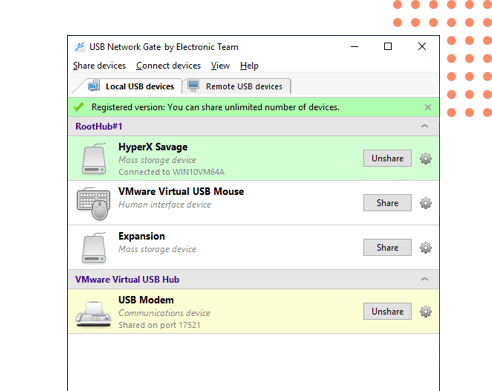
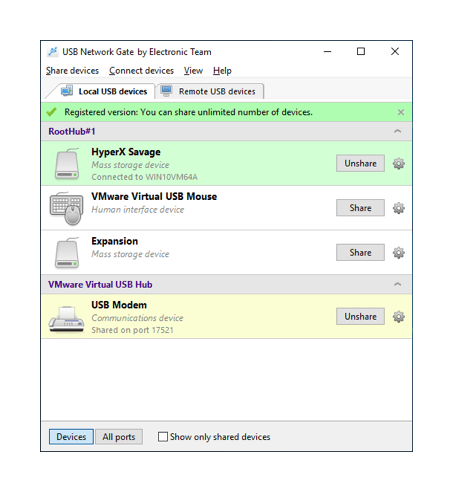
USB Network Gate allows you to share access to a device plugged into your machine so others can have access to its full functionality. It also enables you to access devices on remote computers in your network.

Share USB over RDP

When you use a Remote Desktop Protocol, access even to devices connected to your machine becomes an issue. USB Network Gate helps you solve this problem once and for all — you only need to install it both on your PC and a remote server.

Share USB ports in virtual machines and blade servers

USB Network Gate allows you to access USB ports in virtual machines and blade servers. The software is compatible with VMware, Citrix Xen Desktop, Microsoft Hyper-V. There is absolutely no difference between using a USB device, access to which is enabled by our USB to Ethernet connector, and a device directly connected to your machine.

Share USB device over Ethernet on any platform

The app is cross-platform, which is a major advantage — you can use it in a corporate network on machines running Windows, Linux, Mac and Android. The app supports any kind of a remote device — a webcam, printer, MIDI controller, iPad or even a USB monitor.

USB Network Gate 8.1

How to share USB device over Ethernet

1

Install USB Network Gate on the computer (server), to which a device you need to share is connected physically, and a remote machine (client);

2

Start the app on the server PC and share your USB peripheral over the network;

3

On the client computer find the shared device in the software interface and click “Connect”. Now, the peripheral will appear in the remote system as though it were attached directly to that client PC.

What customers say

4.9 overall rank,based on users' reviews.

Successfully used by 150+ companies worldwide

Saves so much time

Remote access saves our customers so much time and worries about when they will be getting there phone back. Using USB Network Gate is like having the remote phone on my desk plug into my computer.

Randy Albert,
the owner of the Randy Unlock & Repairs

Definitely the best!

USB Network Gate is definitely the best! It allows me to work with native environments from anywhere and develop mobile applications for various platforms from my laptop with ease.

Serge Gulin,
studying Mobile Development

An awesome job!

Before using your USB Redirector I had no way to share USB over network. You guys did an awesome job developing a software like this!

Eric Tichenor,
Lead Software Engineer

USB Network Gate

Share USB devices over Ethernet

Windows (32-bit and 64-bit):
XP/2003/2008/Vista/7/8/10, Windows Server 2012

Also available on: Mac, Linux and Android

USB over Ethernet